

Sensei AI Review
A browser-based AI interview preparation tool that provides you with personalized answers during live interviews.
Key Features
Pricing:
- $89 monthly
- or $288 annually (about $24 per month when billed annually)
Free Trial: Yes
Real-time Assistance: Yes
Best For: Mid-career professionals who want to improve how they structure answers during live interviews
As a mid-level professional, your experience is a major asset that sets you apart. But when it only gets you interviews and not offers, it can start to shake your confidence.
That’s exactly where Sensei AI comes in. Sensei AI is a tool that helps you answer interview questions and communicate with confidence during live interviews. In this review, you’ll learn how it works, how much it costs, and if it’s worth using.
How Does Sensei AI Work?
Setting up Sensei Copilot is quite easy. It only requires basic information to create a personalized experience.
Here’s how it works:
Setting Up Your Account
Step 1: Go to Sensei AI’s official website and click on “Try for free.”
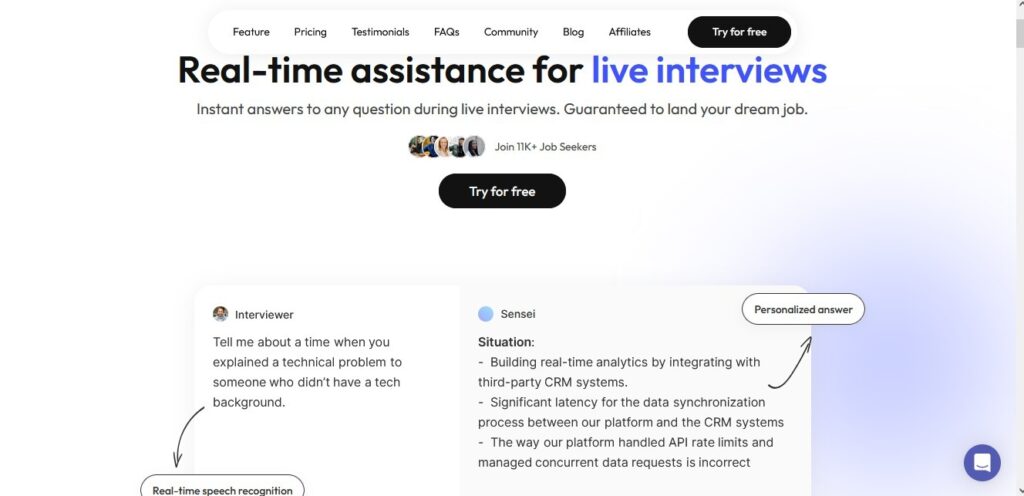
Step 2: Create an account using your Google or LinkedIn details.
Step 3: Once you’ve done that, a pop-up box where you’ll have to fill in the industry, company, and role you’re applying for will appear.
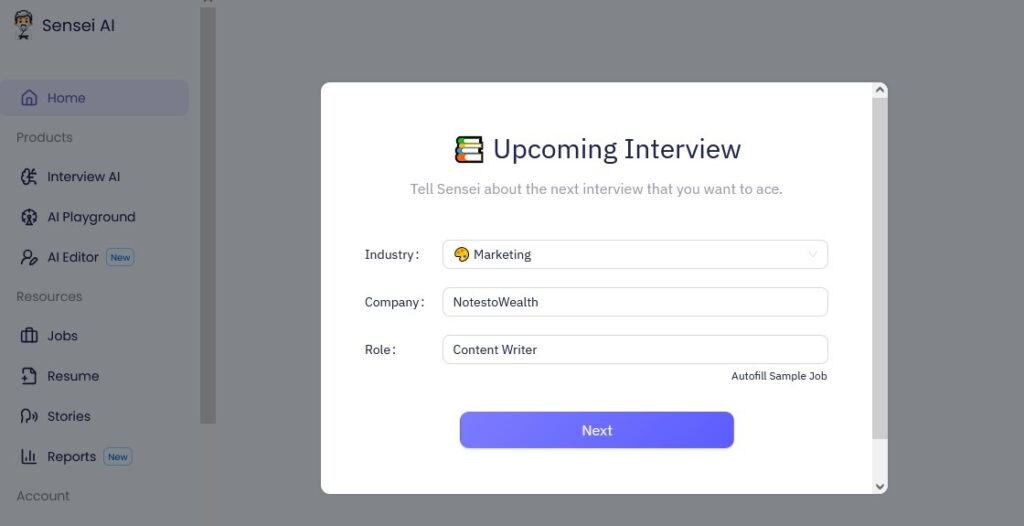
Step 4: Click “Next” to proceed, then upload your resume and indicate how you heard about the platform.
Step 5: Click on “Launch Interview Copilot” to start your interview session.
Launching Interview Copilot for Interview Preparation and Live
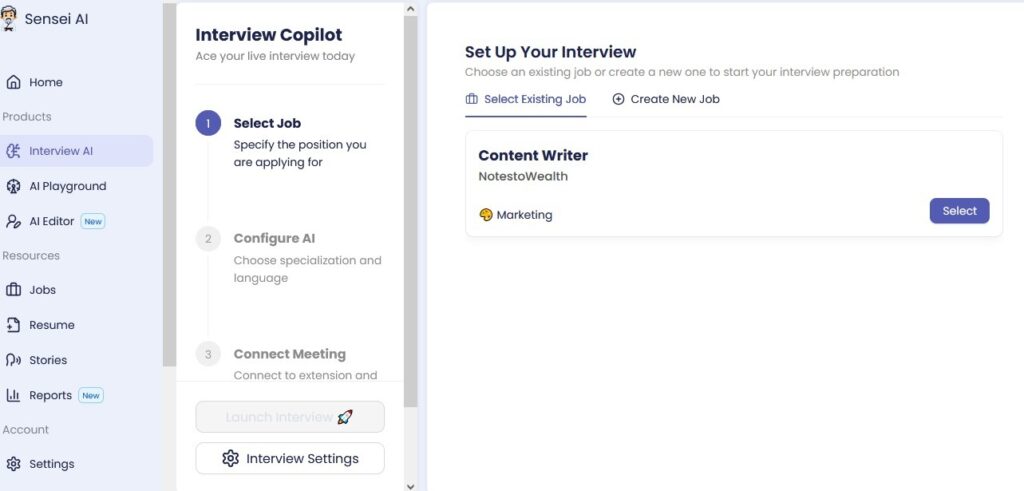
Step 6: To start your interview preparation, you’ll need to select an existing job or create a new one if you’re practicing for a different role.
Then click “Select.”
Step 7: Next you’ll have to configure the AI by clicking on “General Interview.”
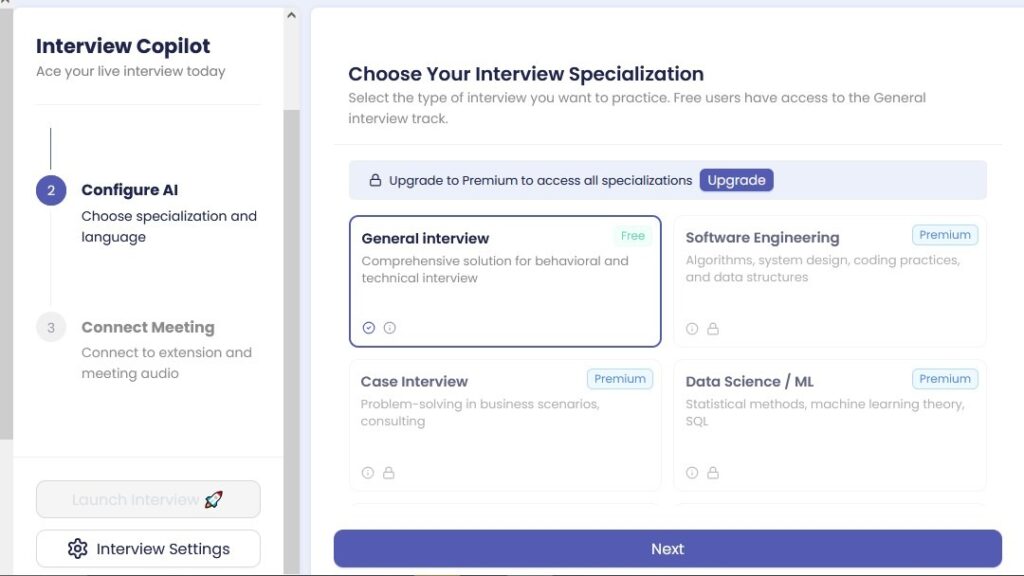
Step 8: Before clicking “Next,” adjust how Sensei responds during interviews by clicking on “Interview settings.”
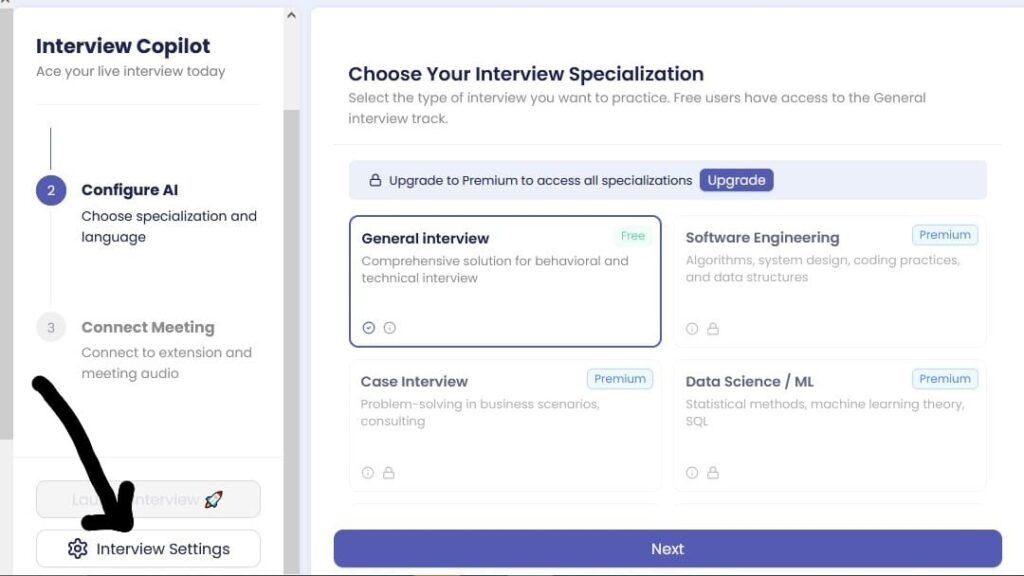
Step 9: Once you do that, you’ll see some options you could choose to match your preference. Here’s what these options mean:
For Sensei Mode:
- Automatic: This allows Sensei to listen to the interviewer and respond on its own when it detects a question.
- Manual: This allows you to control when Sensei responds to any question
For Verbosity:
- Short: This option lets Sensei provide quick, straight-to-the-point answers.
- Medium: This works best if you want detailed answers.
- Long: This provides more detailed and expanded responses. However, if used during interviews, it can make you sound scripted.
For Tone:
- Professional: This option provides you with formal, polished answers for interviews.
- Casual: If you want your answers to sound conversational and relaxed, use this option.
- Enthusiastic: This option provides answers in a more energetic and expressive tone.
For Structure:
- Automatic: This option lets Sensei provide answers in the format it decides.
- Paragraph: This is best if you want your answers in full and natural-sounding sentences.
- Bulleted: Every answer is provided using bullet points.

Step 10: Last, click on “Share Screen” to start the interview prep or live session. Then select the interview tab and ensure the audio is on.

How to Use Sensei AI for Interview Preparation
- Upload your resume and desired job details.
- To strengthen the responses the tool provides, go to the stories feature and share a professional experience or achievement that reflects your skill.
- Then go to the AI Playground and proceed to ask certain interview questions for your role. Once you do that, the AI will provide instant feedback based on the structure and tone you chose.
- For live simulations:
- Play a YouTube mock interview video in your browser.
- Launch Sensei Interview Copilot and share the tab/audio.
- As the video asks questions, Sensei transcribes and shows polished suggestions instantly
How to Use Sensei AI for a Real Interview
- After uploading your resume and job details, select the interview type that fits your role.
- Then join the video conferencing platform in a browser tab. Avoid joining via the desktop app as Sensei won’t be able to access it.
- Go ahead and share your screen with Sensei and ensure you enable audio. For better audio capture and coding assessment, install the Sensei AI Chrome extension. Then enable it during real interview sessions.
Note: The Chrome extension is only available in the pro plan.
Sensei AI
A browser-based AI interview preparation tool that provides you with personalized answers during live interviews.
Main Features of Sensei AI
| Features | Uses |
| Interview Copilot | Provides real-time assistance during live interviews by listening to the interviewer and providing you with answers. |
| AI Playground | A practice space where you can get ready for interviews. Just ask the AI interview questions for your role, and it will give you instant feedback. |
| AI Editor/Resume Builder | This feature lets you edit or optimize your resume by adding stronger wording or improving clarity. |
| Stories | This feature allows you to add more personal context about your experience. You can share details like your achievements in a specific role or experiences. With this, Sensei would be able to create believable behavioral answers during real interviews. |
| Coding Copilot | It lets you practice technical and coding rounds with real-time hints and code suggestions. With the Chrome extension, you can also get code suggestions during technical interviews. |
| Reports | This is a newly added feature on Sensei. It provides feedback on your performance and response quality during interview prep or after an interview. Then suggest areas you can improve on. |
Sensei AI Pricing
Sensei AI offers two main plans, which are the Free plan and the Pro plan.
Sensei AI Free Plan
Sensei AI’s free plan doesn’t require a credit card to gain access.
All you have to do is create an account and upload your resume.
With the free plan, you have access to:
- 15-min Copilot Sessions
- AI Resume Builder
- AI Story Editor
Mock or real interviews are limited to 15 minutes and will automatically cut off during interview sessions.
Sensei Pro Plan
Sensei AI offers a pro plan with both monthly and yearly billing options. The monthly subscription cost $89 per month, while the yearly subscription costs about $288 (or $24 per month) paid annually.
With this plan, you have access to:
- AI Playground
- Unlimited Copilot Sessions
- AI Resume Builder
- AI Story Editor
- Full Customization Suite
- Industry Knowledge Base Add-Ons
- Coding Copilot
Important to note: Sensei AI doesn’t offer refunds.
Once you subscribe, you can cancel your subscription to end future charges, but the previous charges won’t be refunded.
Sensei AI
A browser-based AI interview preparation tool that provides you with personalized answers during live interviews.
What Are Users Saying About Sensei AI?
To decide if the Sensei AI interview assistant is right for you, below is a summary of online feedback from users.
What Users Like
- The fact that Sensei AI covered all interview types
- The tool helped them prepare for interviews effectively
- The responses delivered were always quick and detailed
Recurring Complaints
Some users complained of crashes and bugs. Other users mentioned that customer support was non-existent and that they never got timely responses.
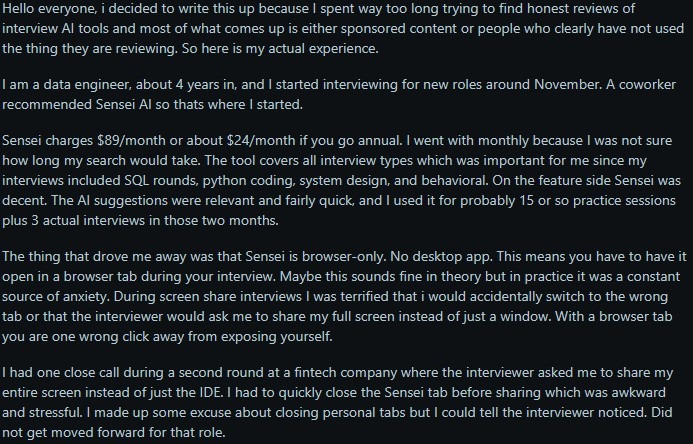
In terms of what the Sensei Copilot has to offer, some users didn’t like the idea that there’s only a browser version.
Below is a screenshot from Chrome-Stats that shows user feedback for Sensei Copilot.

This next image is a screenshot showing a user’s critical feedback on Reddit.
Overall Sentiment
Sensei AI is a useful interview preparation tool that can boost users’ confidence during interviews. But issues like bugs and browser limits can greatly affect its reliability.
Who Is Sensei AI Best For?
Sensei AI is best for specific users such as:
- Mid-career professionals in tech, engineering, product, or business
- Candidates preparing for behavioral interviews
- Non-native English speakers who want to express ideas more fluently
Sensei AI might not be a great fit for individuals who need to share their full screen or perform live coding assessment during interviews.
Entry-level candidates with little to no work experience might not get as value out Sensei AI, since the tool relies heavily on past experiences and achievements.
Sensei AI
A browser-based AI interview preparation tool that provides you with personalized answers during live interviews.
Sensei AI Limitations
Just like every tool, Sensei Copilot has its own limitations. It can’t provide accurate answers if you don’t know your role enough or you have weak work stories.
Also, on the free plan, users are only given 15 minutes per session. This means you can’t do a full-length interview without upgrading.
Aside from the session cap on the free plan, there’s a high possibility the interviewer or company could notice the tool if you’re required to share your screen.
Pros
Cons
Final Verdict
Sensei AI could be worth it if you’re a mid-career professional who’s looking for real-time assistance when you deliver answers during interviews.
Its personalization, coding support, and multilingual capabilities also makes it a strong tool for interview preparation.
However, at $89 per month for the monthly subscription, it’s pricier than some of its competitors.
Because Sensei AI is mostly browser-based, it may not suit some interview setups that require sharing of your full screen.
If you’d like to explore other alternatives, check out our guide on the best AI interview assistants.
Frequently Asked Questions
Written By

Sifon Philip
Sifon Philip is a SaaS, tech, and personal finance content writer.
Outside of work, she enjoys reading content from her favorite writers and watching C-dramas and K-dramas.